Event Planning for Engaging Virtual Team Events: The Complete 2026 Playbook

Virtual team events have evolved far beyond awkward Zoom happy hours and forced icebreakers. In 2026, engaging virtual team events are a strategic investment — one that drives measurable engagement, strengthens remote culture, and costs roughly 75% less than in-person equivalents.
But planning a virtual event that people actually want to attend? That requires more than a calendar invite and a video link. This guide covers everything — from defining your purpose and choosing the right format, to the exact tools, timelines, and facilitation techniques that turn a forgettable Zoom call into a team experience people genuinely remember.
And because we believe planning should take minutes, not months, we've included bookable virtual team-building packages from Events In Minutes that you can deploy with your remote team immediately — complete with shipped kits, live instructors, and zero logistical headaches.
Why this matters in 2026: Only 31% of workers report feeling engaged at work. Structured virtual team building can drive a 25% increase in engagement metrics over six months — and virtual events cost an average of $42,000 less per session than in-person gatherings while delivering up to 12% higher ROI.
1 Define Your Purpose & Success Metrics
Before selecting a platform or sending invites, get crystal clear on why you're hosting this event. Every decision downstream — format, duration, budget — flows from your stated purpose.
Common virtual event purposes: social bonding and team morale, new-hire onboarding and integration, employee recognition and celebrations, skill development and learning, collaborative problem-solving and team building, and quarterly or annual team retreats.
Success metrics to track: attendance rate (aim for 80%+ for mandatory, 60%+ for optional), real-time engagement signals like chat activity, emoji reactions, and poll participation, post-event survey scores (send within 24 hours), and qualitative feedback from team leads. Define these before the event so you can measure improvement over time.
2 Choose the Right Virtual Event Format
Not every event needs to be a 90-minute production. Match the format to the purpose, and respect your team's energy and attention span.
Quick energizers (15–30 min) work best for weekly check-ins — think icebreakers, trivia rounds, or show-and-tell sessions. These keep the team connected without Zoom fatigue.
Deep team-building sessions (60–90 min) are ideal monthly or quarterly. These are facilitated, structured experiences — like virtual escape rooms, creative workshops, or problem-solving challenges — that require active participation and small-group breakouts.
Workshops and skill sessions (45–90 min) combine learning with hands-on activity. The most effective ones ship physical materials to participants so everyone is building or creating something together in real time.
Social hangouts (30–60 min) are low-pressure gatherings — themed happy hours, playlist parties, or casual cooking demos. Keep them optional and fun.
Long-form virtual retreats (half-day to full-day) should mix formats: keynotes, breakout sessions, social time, and buffer breaks. Never run a single session longer than 90 minutes without a break.
3 Plan Your Timeline & Agenda
Share your agenda 48–72 hours before the event. A clear agenda reduces no-shows and sets expectations. Here's a sample structure for a 60-minute virtual team-building session:
- 0–5 min: Welcome, objectives, and tech check
- 5–15 min: Icebreaker or warm-up activity
- 15–45 min: Main activity in breakout rooms (4–6 people per group)
- 45–55 min: Group debrief — each team shares their experience
- 55–60 min: Closing, shout-outs, and next steps
Pro tip: For global teams, rotate event times quarterly so the same time zone isn't always disadvantaged. Or offer asynchronous participation options where possible.
4 Technology & Logistics Setup
Your tech stack makes or breaks the experience. Choose a stable video platform (Zoom, Google Meet, or Microsoft Teams) and layer in interactive tools to keep engagement high.
Essential features to use: breakout rooms for small-group work, polls and live quizzes (Mentimeter, Kahoot, or native platform polls), collaborative whiteboards (Miro, MURAL, or FigJam), reaction emojis and chat for real-time feedback, and screen sharing for guided activities.
Logistics checklist: run a tech rehearsal with hosts and facilitators 48 hours before the event, send calendar invites with timezone-converted times and a direct join link, share any pre-read materials or supply lists 5–7 days early, and for kit-based workshops, confirm shipping addresses at least 2 weeks ahead.
5 Accessibility & Inclusion
Virtual events have a major advantage over in-person ones: they can be inherently more inclusive — if you design them that way.
Enable captions and closed captioning on every call. Share the agenda and any written materials in advance so non-native speakers can prepare. Rotate speaking roles and use small-group breakout formats to draw out quieter participants. Offer multiple time-slot options or asynchronous components for global teams across time zones. And choose activities that don't require high-speed internet, special hardware, or physical ability — shipped-kit workshops are ideal because everyone participates at the same level.
6 Facilitation & Engagement Techniques
The single biggest factor in whether a virtual event succeeds is the quality of facilitation. Always appoint two people: a facilitator (who runs the experience) and a tech co-host (who manages breakout rooms, polls, and troubleshooting).
Engagement techniques that work: alternate formats every 10–15 minutes (discussion → activity → reflection) to maintain energy. Use low-friction interactive tools — nobody should need to download an app or create an account. Assign roles in breakouts (timekeeper, note-taker, reporter) so everyone has a purpose. Use visuals, short video clips, and sound cues instead of endless slides. Open and close with energy — the first 90 seconds and last 60 seconds shape how people remember the event.
Quick icebreakers that actually work: "Two truths and a highlight" (work or personal), photo prompt ("share a photo that represents your week"), one-word check-in with round-robin, and 3-minute paired breakouts to answer one fun question.
7 Budget & Swag Strategy
Virtual events are dramatically cheaper than in-person gatherings, but a small investment in physical materials creates an outsized impact on engagement.
Low-budget ideas ($0–$25/person): e-gift cards, food delivery vouchers, or Spotify playlists curated by the team. Mid-range ($30–$85/person): shipped activity kits (terrarium kits, wreath-making supplies, moss art materials) combined with a live instructor on video. Premium ($85–$150/person): full creative workshop kits with premium materials, branded items, and gourmet snack boxes.
The shipped-kit model is the sweet spot for virtual team events in 2026. It gives remote workers a tangible, shared experience — something they can hold, build, and display — which is exactly what video calls alone can't deliver.
8 Measurement & Follow-Up
Close the loop within 48 hours. Send a quick 3–5 question post-event survey, share highlights or a recording with the team, and act on feedback publicly ("Last time you said X — so this time we're doing Y"). This builds trust and increases future attendance.
Recommended cadence for virtual team events: weekly short energizers (15 min), monthly team socials (45–60 min), quarterly deep team-building sessions (60–90 min), and an annual virtual retreat (half-day to full-day).
💻 Bookable Virtual Team Events on Events In Minutes
Stop planning from scratch. These vetted virtual packages include live instructors, shipped kits, and instant booking — so you spend minutes planning, not months.
 1
💻 Virtual / Remote
1
💻 Virtual / Remote
Virtual Self-Guided Escape Room
The most budget-friendly virtual team-building option available — and one of the most effective. No downloads, no installations, no complicated setup. Just share a link and your team dives into collaborative puzzle-solving from anywhere in the world. Features multiple difficulty levels, a built-in hint system, and competitive team scoring. Self-guided format means your team plays at their own pace, making it ideal for asynchronous participation across time zones. At just $30/person, it's perfect for large distributed teams on a budget — scaling all the way to 1,000 participants.
 2
📦 Kits Shipped Nationwide
2
📦 Kits Shipped Nationwide
Virtual Mini Terrarium Workshop
One of the most popular virtual team activities on Events In Minutes — and for good reason. Complete terrarium kits (glass vessel, soil layers, live plants, moss, and decorative stones) are shipped directly to each participant's door. Then everyone builds together over Zoom with a live instructor guiding the session. It's the perfect blend of shared experience and tangible creation — everyone ends up with a beautiful, low-maintenance desktop garden they actually keep. As one Uber team lead said: "The Mini Terrarium Workshop was absolutely fantastic — the perfect mix of fun, creativity, and team activity."
 3
📦 Kits Shipped Nationwide
3
📦 Kits Shipped Nationwide
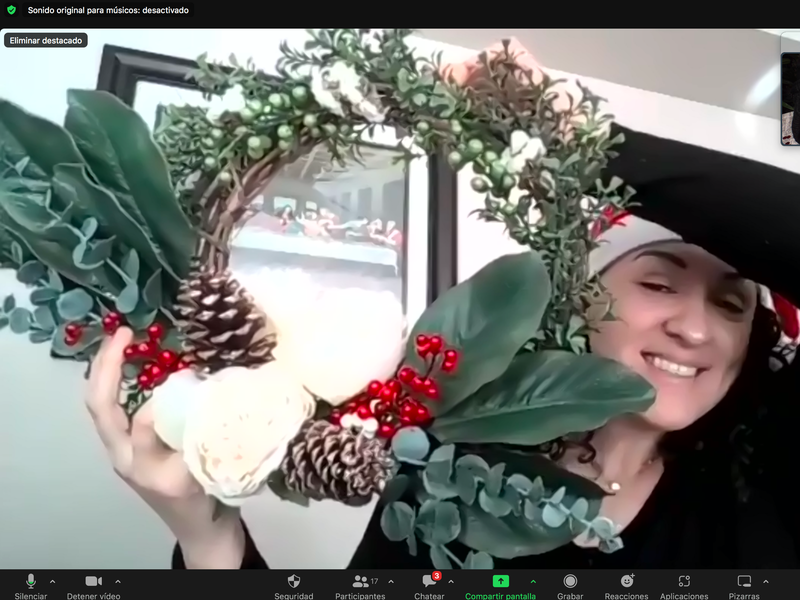
Virtual Seasonal Wreath Workshop
Premium wreath-making kits — including a wire frame, seasonal greenery, decorative elements, ribbon, and all necessary tools — are shipped to each participant before the event. A live instructor then guides the entire group through assembly and design over video call. The result: a professional, door-ready wreath that becomes a personal keepsake from the team experience. This is the go-to choice for holiday team events, year-end celebrations, and Q4 company gatherings. Scales to 500 participants with nationwide shipping, making it ideal for fully distributed organizations.
 4
📦 Kits Shipped Nationwide
4
📦 Kits Shipped Nationwide
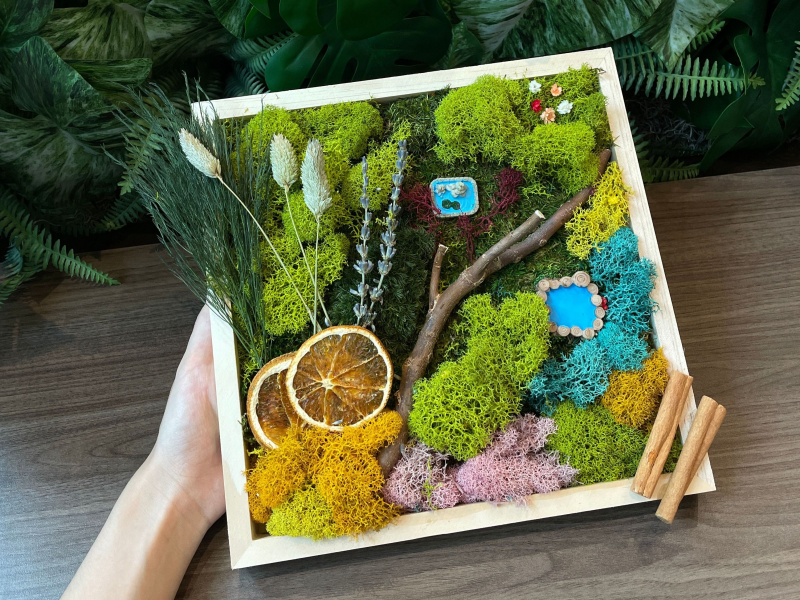
Virtual Moss Wall Art Workshop
Create a stunning, maintenance-free moss wall art piece over Zoom — with full kits shipped to every participant. Each kit includes a framed backing, preserved moss in multiple colors and textures, adhesive, and design tools. A live instructor walks the group through composition principles, color pairing, and assembly techniques. The finished piece is a permanent, living-room-worthy artwork that requires zero watering and zero sunlight. It's the most visually impressive virtual workshop available — participants display their moss art at home and remember the team experience every time they see it. Scales to 500 people, shipped nationwide.
Frequently Asked Questions
How much do virtual team-building events cost?
What virtual events work best for large groups (100+ people)?
How far in advance should I book a virtual team event?
Are virtual team events effective compared to in-person?
What if my team is spread across different time zones?
How often should we run virtual team events?
Ready to Plan Your Virtual Team Event?
Browse all virtual packages, get instant pricing, and book in minutes — not months.
Explore All Virtual Packages